Loading Now

Create a SCCM Device Collection by IP or Subnet
Create a SCCM device collection based on ip or subnet

This post will show you how to create a SCCM Device Collection by IP or Subnet. This is useful for applying scripts or policies to devices that are in a particular subnet. For creating a device collection see this post. This code below is the Query Rule code you will put in your membership rules.

Query Code

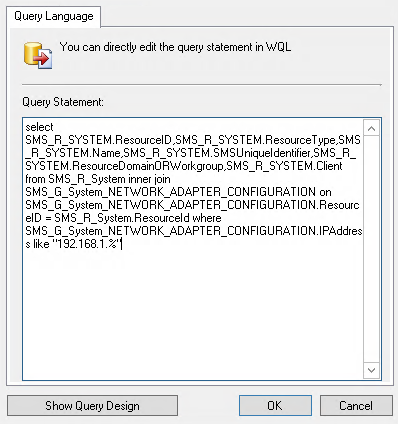
Paste this code in the Show Query Language menu in your query rule. Notice the IP 192.168.1.% change this to your needs. The % is a wildcard so put that in the octet you want as a wildcard. In my example this will include any devices that have an IP in the range of 192.168.1.1-254.

select SMS_R_SYSTEM.ResourceID,SMS_R_SYSTEM.ResourceType,SMS_R_SYSTEM.Name,SMS_R_SYSTEM.SMSUniqueIdentifier,SMS_R_SYSTEM.ResourceDomainORWorkgroup,SMS_R_SYSTEM.Client from SMS_R_System inner join SMS_G_System_NETWORK_ADAPTER_CONFIGURATION on SMS_G_System_NETWORK_ADAPTER_CONFIGURATION.ResourceID = SMS_R_System.ResourceId where SMS_G_System_NETWORK_ADAPTER_CONFIGURATION.IPAddress like "192.168.1.%"

It should look something like this:

Screenshot_20200925_103537 Create a SCCM Device Collection by IP or Subnet

My name is Skylar Pearce, I have been working as a System Administror since 2013 as well some side consulting work. During my career I have worked with everything from Active Directory and vCenter to configuring routers and switches and phone systems, documenting and scripting my way through the whole thing. I have a Security+ certification and am currently working on my PenTest+. Throughout my career I have gained almost all of my knowledge from blogs like this. It is now time for me to pay it back. Over time I have gathered scripts and tricks over the years that I will share on this site. A lot of the posts here will be mainly reference posts, some will be full on how to’s. I am happy to go into more depth on any other topics I go over here, just make a comment on a post. I will do my best to post once a day on weekdays but as I run out of ideas it may slow down. My WordPress skills are still growing so the site will likely get better over time as I learn. You can reach me at contact@allthesystems.com or on LinkedIn